 ContractorKeith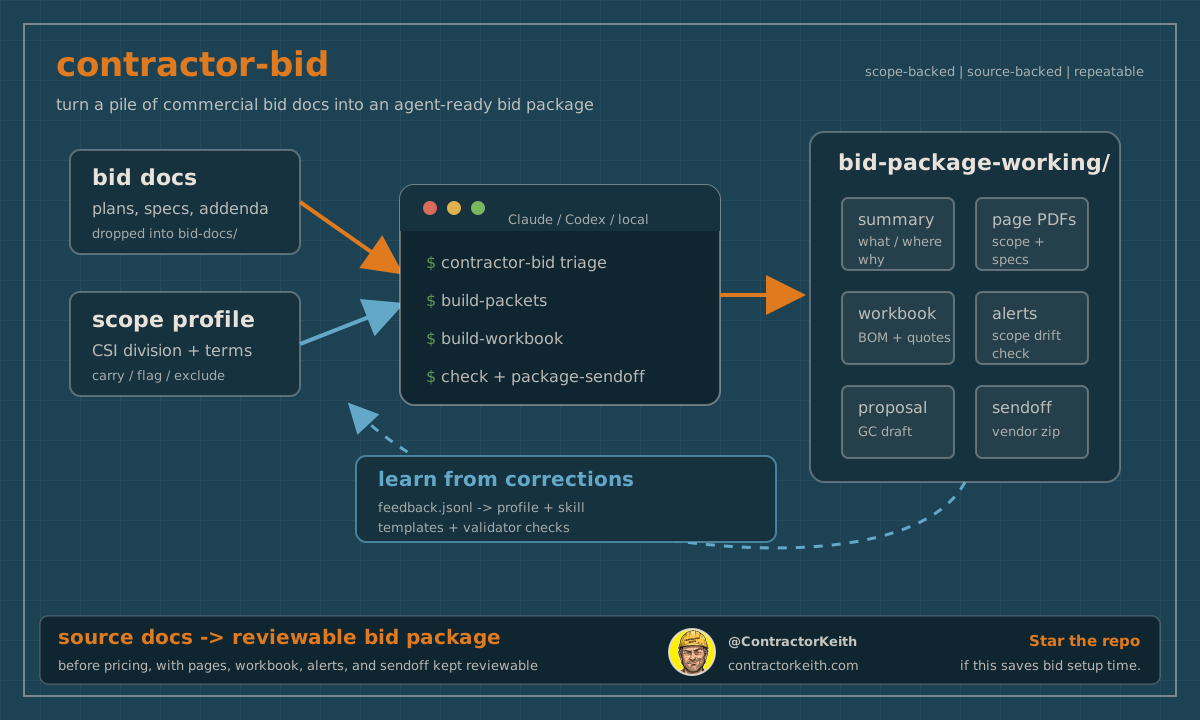
you type one line to your agent:
start a new bid project for my electrical scope.Claude, Codex, or Cursor builds the bid folder, pulls the pages that matter out of the plan set, and hands you a package you can open and check. that is contractor-bid, and version 0.2.0 is what makes that one line work.
i estimate fences and gates in div 32. you might run electrical, or concrete, or drywall, or hvac. the trade changes. the setup grind before the first number does not.
what it is
contractor-bid is two layers.
the first is a Python cli that does the deterministic work: it reads your bid PDFs, scores the pages likely tied to your scope, builds page packets, builds a takeoff workbook, runs a validator, and zips a sendoff folder. JSON files are the source of truth, and the scripts turn them into files you can review.
the second layer is new in 0.2.0. it is an MCP server plus plugin metadata for Claude Code, Codex, and Cursor. that layer is what lets you drive the whole thing by talking to your agent instead of memorizing cli flags.
the cli still runs on its own if you want it. but most estimators will never touch a flag.
how you set it up
install the engine once:
pipx install "contractor-bid[mcp]"that gives you the cli and the contractor-bid-mcp server in one shot. then add the plugin inside Claude Code:
/plugin marketplace add ContractorKeith/contractor-bid
/plugin install contractor-bid@contractor-bid
Codex and Cursor reuse the same server and the same skills, so the agent files do not get rewritten three times. the repo ships the manifests for all three.
run contractor-bid doctor to check your machine. it tells you if Python and Poppler are set up, and Poppler is the one most people forget. without it, text-based plans still work through a fallback, but scanned image-only plans need OCR first, which this tool does not do yet.
how a bid runs
here is the order, whether you type it to the agent or run it yourself.
contractor-bid new bids/070126-example-project \
  --profile division-26-electrical \
  --project-name "Example Project" \
  --bid-due "2026-07-01 14:00"
drop your source PDFs and bid forms into bid-docs/. then the agent walks the steps:
contractor-bid triage bids/070126-example-project --profile division-26-electrical --render --write-sources
contractor-bid build-packets bids/070126-example-project
contractor-bid build-workbook bids/070126-example-project --profile division-26-electrical
contractor-bid check bids/070126-example-project --profile division-26-electrical
contractor-bid package-sendoff bids/070126-example-project
triage is the part worth understanding. it does not commit a scope call. it writes its guesses to scope-pages-sources.suggested.json, and you review that file and merge the pages you approve before packets get built. the suggestions are a starting point, not a price.
that boundary is the whole point. the agent sorts and indexes. you decide.
what you get
each bid project is built around bid-package-working/:
00-Bid-Scope-Summary.md, the first read on what the job is, where it is, what to open first, and what is excluded00-Scope-Reference-Index.md, the drawing and spec index so the source trail stays visiblescope-pages.pdf, the drawing pages tied to your scope instead of the full plan dumpspec-pages.pdf, the relevant spec pages when they are foundscope-and-spec-pages.pdf, one combined packet for review or a supplier handoff01-Takeoff-Worksheet-REV1.xlsx, a workbook with bom rows, quote inputs, rfis, alerts, and sources02 - Proposal Letter.md, a proposal draft with inclusions, exclusions, alternates, and clarificationsALERTS.md, the validator report for missing pieces, addenda, due dates, and scope that drifted insupplier-sendoff/*.zip, a clean package to send vendors or keep for internal review
every file traces back to a source page or a stated assumption. that is the difference between “the model told me something” and “the model made me a package i can check.”
pick your division
the part that matters for your trade is the scope profile.
a profile says what your scope carries in the base bid, what it usually excludes, which terms should trigger a review before you price, and which spec sections are likely yours. the tool ships canonical starters for the active CSI MasterFormat divisions from 03 through 33: concrete, masonry, metals, openings, finishes, plumbing, hvac, electrical, earthwork, utilities, and the rest.
so an electrical estimator gets a profile watching panel schedules, fixtures, conduit, and controls responsibility. a concrete sub gets one watching paving, jointing, and reinforcement callouts. i get one watching cantilever gates, panic hardware, and gate operators.
if your company carries scope differently, run contractor-bid init. it writes a profile and a matching skill the agent reads before it makes any scope call.
the parts that keep it honest
two more pieces are worth knowing about.
ALERTS.md is a validator, not a summary. it flags missing deliverables, due dates inside two days, unhandled addenda, and excluded or review-only terms that showed up in your scope anyway. it is the thing that catches the sheet you skipped at 11pm.
contractor-bid learn records corrections to a local feedback log. when you correct the agent on something your trade knows and the architect always hides, that correction lands in .contractor-bid/LESSONS.md for the next bid. when it becomes a durable rule, it moves into the profile or the validator.
there is also a workspace-level bid tracker. track-add, track-update, and track-move keep every bid in flight on one spreadsheet, with due dates inside two days in amber and past-due in red. the agent can keep it current as you work, and it asks for confirmation with a change summary before every write. no silent edits to your pipeline.
what it is not
it is not a pricing engine. it does not measure the job, call your supplier, or know what your crew costs on a bad week in august.
it is not a legal or contract review tool. it does not read scanned drawings without OCR. and it does not guarantee every sheet was found, which is why a person stays in the loop.
it does one job: cut the time between “i got a bid invite” and “i have a source-backed package i can review and price.”
getting it
the repo is public at github.com/ContractorKeith/contractor-bid. install it, point it at a real bid, and see where it saves you time and where it wastes it.
if you estimate a trade i do not, the most useful thing you can send is a profile. not your proprietary bid docs or customer files. sanitized scope terms, common exclusions, the stuff that should get flagged before pricing, and better notes for your division.
concrete subs know concrete problems. electricians know electrical problems. i know fences and gates, which was enough to start this.
star it if it helps, open an issue if it breaks, and tell me where the next bid folder is still dumb.